
Quantiloop Pro - Live Looper2.98.5 - App Store
Sie können Ergebnisse sehen in einige Sekunden.
Herausgeberbeschreibung


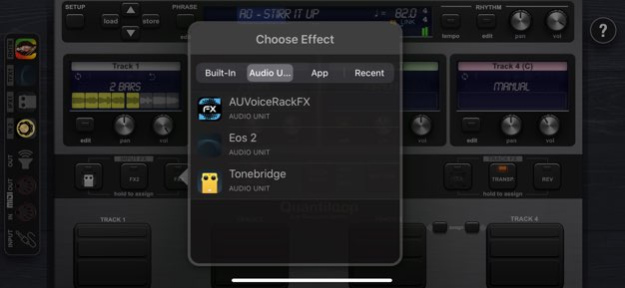
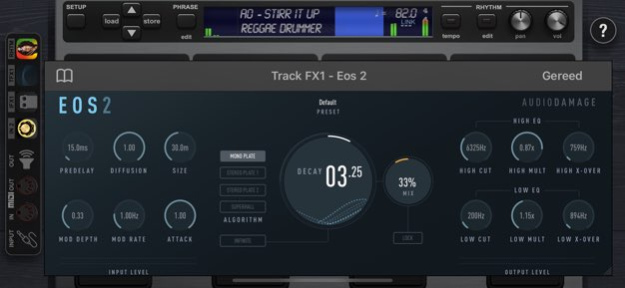
Quantiloop ist hauptsächlich auf Live Auftritte mit Freihand-Steuerung ausgerichtet und bildet die intuitive und einfache Bedienung eines Hardware-Loopers auf dem iPad nach. Zusätzlich gibt es jede Menge erweiterte und neue Funktionen! Kontrolliere es per angeschlossenem MIDI-Fußschalter oder nutze voreingestellte Loop-Länge und Auto-Recording für einen automatischen Ablauf.
Sei einfach kreativ!
Arbeite mit 4 Spuren, welche unendlich viele Overdubs bieten - alles in perfekter Synchronisation. Lege z.B. Strophen, Refrain und Brücken in den Spuren an und schalte nahtlos zwischen diesen um.
Oder kreiere z.B. einen kurzen, perkussiven Loop auf Spur eins, eine Akkordfolge in 4 Takten auf Spur zwei, füge Bass-Linien auf Spur drei hinzu und improvisiere dann dazu!
Neben den bekannten Hardware-Loopern stand hier teilweise auch das Looper-Setup von Ed Sheeran Pate, um einen kreativen und professionellen Ablauf beim Looping zu ermöglichen.
Baue auf Rhythmus mit System!
Das eingebaute Rhythmus-System hilft Dir, jederzeit das richtige Timing zu haben. Benutze das interne Metronom zum Üben oder zum Einzählen bei der Aufnahme.
Importiere Schlagzeug-Spuren oder andere Rhythmus-Begleitungen von fast überall. Quantiloop erlaubt auch, Deine IAA-fähigen Lieblings-Apps für Rhythmus & Beat einzubetten und zu kontrollieren.
Per MIDI oder Ableton Link lässt sich das Tempo synchronisieren, egal ob zu internen Apps oder externen Geräten.
Timing ist Alles!
Quantiloop stellt durch Quantisierung sicher, dass Du jederzeit zum nächsten Beat oder Takt synchron bist. Echtzeit-Tempo-Änderungen sind dabei jederzeit möglich und steuern die Geschwindigkeit.
Bevorzugt man sein eigenes Tempo, kann die Quantisierung auch abgeschaltet werden - Quantiloop unterstützt Dich dann mit geringer Latenz und ausgefeilten Mechanismen, um synchrone Aufnahmen zu ermöglichen.
Es stehen Dir hierfür 4 verschiedene Abspielmodi zur Verfügung.
Eigenschaften:
• Abspiel-Varianten: frei, synchronisiert, seriell und seriell mit Master Spur
• Verschiedene Quantisierungs-Modi
• Verschiedene Modi zum Stoppen
• Einzigartiger "Arm" Modus, ähnlich Ed Sheeran Looping
• Unendlich viele Overdubs pro Spur
• Overdub Abklingrate (Decay)
• Rückgängig (undo) / Wiederherstellen (Redo)
• Auto-Aufnahme
• Hochqualitatives Stereo Audio
• Klare, leicht zu erfassende Anzeige des Loop-Zustands
• Rhythmus-System mit optionalem Auto-Start, Auto-Stop und Einzählen
• Hör- und sichtbares Metronom
• Sende Start- und Stop-Befehle und synchronisiere zu eingebetten Rhythmus-Apps
• Synchronisation zu Host-Apps, wenn Quantiloop selbst eingebettet ist
• Tempo-Steuerung in Echtzeit, inkl. Time-Stretching
• Sehr mächtige MIDI-Steuerung möglich
• Mehrfache Zuweisung von Aktionen zu einem MIDI Controller möglich (tippen, halten, doppelt tippen)
• MIDI Program Change kann zum Wechsel von Phrasen-Presets benutzt werden
• Unterstützt Audiobus und Inter-App-Audio
• Jeweils einzelne Ausgänge für die 4 Spuren und die Rhythmus-Spur
• Speichere Phrasen-Presets in unendlich vielen Bänken mit jeweils 32 Presets
• Einzelne Regler für Volumen und Stereo-Position für jede Spur
• Unterstützt Ableton Link für eine Zwei-Wege Tempo-Synchronisation mit anderen Apps
• MIDI Clock Synchronisation (sowohl Slave als auch Master) sowie Start/Stop per MIDI
• Eingebaute Effekte wie Transponieren, Delay & Reverb, Ein- und Ausblenden, Tape-Stop sowie Rückwärts Abspielen
• 3 frei zuweisbare Effekte für die Eingänge (eingebaute Effekte oder IAA)
• 3 frei zuweisbare Effekte für die Spuren (eingebaute Effekte oder IAA)
• Import & Export via Cloud oder andere Apps (iCloud, Google Drive, AudioShare etc.)
• AudioCopy/Paste wird unterstützt
• "Öffnen in" wird unterstützt
Über Quantiloop Pro - Live Looper
Das Unternehmen, das Quantiloop Pro - Live Looper entwickelt, ist Stephan Marx. Die neueste vom Entwickler veröffentlichte Version ist 2.98.5.
Um Quantiloop Pro - Live Looper auf Ihrem iOS-Gerät zu installieren, klicken Sie einfach auf die grüne Schaltfläche Weiter zur App oben, um den Installationsvorgang zu starten. Die App ist seit 2025-08-18 auf unserer Website gelistet und wurde 0 Mal heruntergeladen. Wir haben bereits geprüft, ob der Download-Link sicher ist; zu Ihrem eigenen Schutz empfehlen wir jedoch, die heruntergeladene App mit Ihrem Antivirusprogramm zu scannen. Ihr Antivirusprogramm kann Quantiloop Pro - Live Looper als Malware erkennen, wenn der Download-Link defekt ist.
So installieren Sie Quantiloop Pro - Live Looper auf Ihrem iOS-Gerät:
- Klicken Sie auf unserer Website auf die Schaltfläche Weiter zur App. Dadurch werden Sie zum App Store weitergeleitet.
- Sobald Quantiloop Pro - Live Looper im iTunes-Eintrag Ihres iOS-Geräts angezeigt wird, können Sie den Download und die Installation starten. Tippen Sie rechts neben der App auf die Schaltfläche LADEN, um den Download zu starten.
- Wenn Sie nicht in der iOS App Store App angemeldet sind, werden Sie nach Ihrer Apple-ID und/oder Ihrem Passwort gefragt.
- Nachdem Quantiloop Pro - Live Looper heruntergeladen wurde, sehen Sie rechts einen INSTALLIEREN-Button. Tippen Sie darauf, um die eigentliche Installation der iOS-App zu starten.
- Sobald die Installation abgeschlossen ist, können Sie auf die Schaltfläche ÖFFNEN tippen, um sie zu starten. Das Symbol wird außerdem zum Startbildschirm Ihres Geräts hinzugefügt.
Programmdetails
Systemanforderungen
Download-Informationen
Preisgestaltung
Versionsgeschichte
Version 2.98.5
veröffentlicht am 2025-08-18
Various Bug Fixes
iOS compatibility
Version 2.98.5
veröffentlicht am 2026-10-13
Version History Various Bug Fixes
iOS compatibility 2.98.5 08/18/2025 * Library Upgrades
* iOS/iPadOS compatibility
* General stability improvements
* Improved responding to MIDI bank changes
* Avoid a crash when IAA/AUv3 app in a preset was uninstalled from the device. 2.98.4 03/16/2023 -Updated Linkkit and Audiobus libraries
-Changed numbering of Preset Banks and Presets to be in sync with MIDI PC numbers
-Optimized loading of audiounits/iaa apps when changing presets, which also improves stability of loaded plugins
-Added a phrase volume (with midi control) so presets can be levelled by storing the volume in the preset
-Misc. Stability improvements 2.98.3 08/13/2022 - Fixed an issue with Beatbuddy transitions. triggering to late
- Workaround for crash in iOS 15 AUv3 MIDI plugins
- General iOS 15 Compatibility issues 2.98.2 10/11/2021 Ableton Link Fixed for iOS 14.x 2.98.1 07/02/2021 - Fix for MIDI assignment window not working correctly on iOS 14
- Minor stability improvements 2.98 03/10/2021 - Stability Improvements
- iOS 14.x compatibility improvements
- Audiobus, LinkKit SDK Updates 2.97 02/24/2021 Minor stability improvements 2.96 05/11/2020 Saving and Recall of settings for AU rhythms.
Stability Improvements
Workaround for AU loading issue in iOS 13.x
Improved unloading of AU’s on exit to avoid ghosts
Fixed ‘More Window’ from preset window not showing on iPhone
Audiobus and Linkkit upgrades
Fixed latency correction dialogs on iPhone X(s)(r)
Add support for using bluetooth headsets 2.95 04/25/2020 - Fixed some iOS 13.x compatibility issues
- Fixed a latency related issue
- Fixed sample rate conversion when using AudioCopy
- Update to latest Audiobus SDK
- Master Volume MIDI control action (continues)
- Track Volume MIDI control for current armed track
- Advanced setting to set bit depth for exported loops
- Exported loops now include a timestamp
- Correctly pass time signature to AU clients 2.94 09/28/2019 General Improvements and Fixes
- Fixed display on iPad Pro 11 inch
- Improved Tap-Tempo
- Reduced CPU usage at low latency settings
- Fixed an issue that could cause pops in recorded audio when switching apps and connected to multiple inputs
- Fix an issue that caused rhyhtm auto-start to be out of sync with manual output latency comp set
- On changing timesignature change BPM so audio does not timestretch
- Fixed an issue at that would cause recordings to fail at the lowest latency settings
- Fixed: an issue where an instant dub was stopped to earlly when switching serial tracks
- Fixed some issues with Compressor AU
- Don’t send MIDI start messages when switching loops if rhythm already playing
Added several Advanced Options
- Option to skip empty presets when changing presets over MIDI
- Option to always round tap-tempo to whole numbers
- Option to store user buttons assignments (track 3/4) globally instead of per preset
- Option to disallow preset changes (from MIDI) when something is playing in advanced options
- MIDI timestamp option for tap-tempo (when enabled MIDI timestamps are used which is most accurate) However some controller like the IRIG blueboard don’t send correct timestamps.
(See also quantiloop.com/midicontrol)
Audiobus
- Added statesaving
- Audiobus Remote triggers for enabling FX 2.93 03/08/2019 General stability improvements 2.92 01/21/2019 - On preset load enable/disable looperbypass effect correctly
- Start/All MIDI action now starts all remaining paralel tracks if a track is already playing
- Fixed an issue where overdubs where out of sync when an audio interface would report fluctuating latencies.
- Fixed an issue were loops would get garbled when changing presets while receiving clock
(Beatbuddy mostly)
- Fixed an issue with recording a fixed number of measures
- When changing the number of measures of a track now the global BPM changes as well so no time stretching occurs.
- Fixed an issue where overdubbing failed when overdub after rec was on.
- When triggering a stop while recording do NOT delete recording but stop it instead (even if stop mode is instant).
- Fixed a bug with audiio stopping after going to the background and coming back to foreground in iOS 12
- Fixed saving of decayAtNyQuiest setting of delay effect
- Workaround for Ableton Link beat not being set when starting
- Updated LinkKit and Audiobus interfaces
- Fixed auto-transition for Beatbuddy
- Assign next/prev preset to hold or doubletap 2.91 01/13/2019 User Interface:
* Dark mode, for better readability on stage
* Track Labeling
* DSP display, click to get more info
* Show status bar with battery display
* Simplified/Rearranged some settings to more logical places (track, phrase, rhythm)
* External Sync display
* WaveForm display
* Improvements to all stepper controls (E.g. BPM). Holding the control in the center brings up a dialog for direct text entry.
* iPhone Xs support
Looper
* Song Parts - Assign a track to any song part to allow for any serial/parallel looping setup. (E.g. Track 1 percussion, Track 2-3 part A, track 4 part B etc)
* New Rec quantize option, allows starting recordings in the middle while keeping start sync
* Quantized Undo/Redo
* Blank Track creation: If the length of a track is known, then holding the track button for an empty track will pre create an empty loop, that then can be used to start dubbing in the middle for instance.
* New AUTO size setting, creates tracks of equal lengths.
IAA/Audio Unit/Effects
* Split effects seperate categories: Bultin, AU, IAA
* Most recently used effects selection
* Easier switching between effects
* IAA Transport improvements from clients hosted in QL
* New ‘Mute Audio’ track effect
Rhythm
* Allow multi select loop import for rhythm loops
* Improved rhythm save dialog
* Import loops between begloop and endloop markers if they exist
Audio Engine
* Reenable Bluetooth output.
* Multiroute audio setting
* Added measurement mode option
* Added 64 frames buffer size (1.5ms) option. (Warning CPU usage)
* Post Fader option for discrete outputs
Advanced Settings
* Added an advanced settings menu under system settings for detailed control of hold actions
MIDI Control
* Added MIDI next/prev bank command (default hold action for next/prev preset
Latency Compensation.
* Much improved automatic round trip latency compensation
* Manual latency compensation on all loaded IAA apps, inputs and outputs. (Hold the icon in the connections panel to bring up the latency comp dialog)
And many other bug fixes and improvements. 2.90 09/26/2018 Fixed a crash on iOS 9
Note that no future updates are planned for iOS 9, if you want to receive further updates please upgrade your iOS version. 2.82 06/25/2018 Our apologies for the broken dubbing in 2.80. This should now be resolved. 2.81 06/21/2018 -Audiobus Triggers & Remote Triggers
(Ie. access Quantiloop from AudioBus Remote side by side with your OnSong etc)
-Updated AudioBus and Ableton Link SDK
-Changed Dubbing behaviour so a multi layer can be undone at once
-Bugfixes 2.80 06/20/2018 Fixed View Size issues introduces by iOS 11.3/XCode 9.3 2.74 04/01/2018 Fixed a crash on iOS 11.3 2.73 03/30/2018 - Added Ableton Link Start/Stop Sync
- Updated Ableton Link 3.01 and Audiobus 3.04 SDK
- Fixed problem with imported loops not being saved correctly
- Added MIDI ‘start track’ action. (Plays track but doesn’t stop it)
- Fixed a display issue in Track Settings
- Fixed a display issue in Track Volume MIDI control action 2.72 03/11/2018 - Latest Audiobus SDK
- Minor Fixes 2.71 01/19/2018 iPhone Version (Universal) 2.7 12/11/2017 * Changed behaviour of track transpose to only transpose one layer.
* This allows you to change key overdub and change key back etc.
* New input-"Effect" Looper Bypass, lets you bypass the looper for a specific input, to avoid a mic being recorded for instance
* New End Fade option (with stop at loop end). Holding the stop button stops with a fade.
* New Play mode: Loop End
* Input Scenes: Store and recall multiple input configurations.
* MIDI Clock Sync Improvements
* Clock Sync Indicator
* Full bidirectional support for the Singular Sound BeatBuddy
* Tempo/Time Signature sync
* Volume/Tempo Control
* Auto Transition / Auto Fill
* Song / Drum set selection
* Pause/Intro/Outro
* MIDI control actions for the BeatBuddy 2.6 10/27/2017 - iOS 11 compatibility changes
- Added Audioshare SDK
- On rhythm loop import from anywhere the rhythm name now defaults to the filename instead of ‘New Rhythm’
- Fixed a problem where in some circumstances a one bar loop would not record
- Correctly set the current track light when using MIDI next / prev track assignment
- Keep AUv3 settings when changing fx target
- Separate Fade In and Out time for effects. Set Fade In to 0 for fade out only.
- Minimum BPM is now 20 for same as Audiobus/Ableton Link 2.5.1 09/20/2017 INPUT ROUTING
* Full input routing. Quantiloop now has 4 configurable inputs.
* Each input can be an IAA/AU, Audiobus, or physical port from a multichannel interface
* Each input can have a fixed effect assigned (e.g. an Ampsim
* Each input can be mapped to the output (monitoring) or any of the tracks
* Each input has gain and pan control
* Input FX can be assigned to a specific input
OUTPUT ROUTING
* 2 Mix Outputs: Main and Monitor (Rhythm can be excluded from main)
* 6 discrete pre-fade outputs for each track, rhythm and input pass through for external mixing (in hardware or IAA/Audiobus)
* Full multichannel selection (including Multiroute)
ROUTING GENERAL
* Routings are remembered per device, so once set up if you move between interfaces your connections will be remembered.
RHYTHM
* Tempo range changed to 30 - 999 bpm
* Odd time signatures from 1/1 to 32/32
* Use 1/4 etc to sync to variable time sig rhythms
PLAYSTYLE
* New Quantise modes
* TempoSync options
* Parallel, Serial and Mixed Play Styles
* DUB MODE: Easily switch between dubbing or stopping tracks without the need for double-taps
* MUTE MODE: Mute/Un-mute tracks without stopping/starting the timeline
MIDI CONTROL
* New MIDI controls for Loop Decay, Input Gain, Volumes, Pans and more
* Additional hold/dbl-tap actions for clear, undo/redo and stop
AUv3
* Use AUv3 as input instruments
* Full AUv3 preset selection and creation
SETTINGS
* Sharing of Presets
* Locking of presets to avoid overwrites
* Backup/Restore system settings to iCloud
MISC:
* Instant dubbing now starts on the down tap (instead of up). If you intended to do an undo/redo it will nicely handle this by cancelling the dub etc…
* Minimum loop size is now about 100 ms
* More override options for each track
* Latest Ableton Link
* Undo/Redo now cancels a recording or overdub when active
* Undo/Redo now also works on stopped tracks
* Many more minor fixes and changes
* New colour scheme for the dialogs, and UI cleanup 2.5 09/01/2017
Version 2.98.5
veröffentlicht am 2025-08-18
Aug 18, 2025
Version 2.98.5
Various Bug Fixes
iOS compatibility
Version 2.98.4
veröffentlicht am 2023-03-16
Mar 16, 2023
Version 2.98.4
* Library Upgrades
* iOS/iPadOS compatibility
* General stability improvements
* Improved responding to MIDI bank changes
* Avoid a crash when IAA/AUv3 app in a preset was uninstalled from the device.
Version 2.98.3
veröffentlicht am 2022-08-13
Aug 13, 2022 Version 2.98.3
-Updated Linkkit and Audiobus libraries
-Changed numbering of Preset Banks and Presets to be in sync with MIDI PC numbers
-Optimized loading of audiounits/iaa apps when changing presets, which also improves stability of loaded plugins
-Added a phrase volume (with midi control) so presets can be levelled by storing the volume in the preset
-Misc. Stability improvements
Version 2.98.2
veröffentlicht am 2021-10-11
Oct 11, 2021 Version 2.98.2
- Fixed an issue with Beatbuddy transitions. triggering to late
- Workaround for crash in iOS 15 AUv3 MIDI plugins
- General iOS 15 Compatibility issues
Haftungsausschluss
Offizieller App Store-Link
Wir hosten Quantiloop Pro - Live Looper nicht auf unseren Servern. Wir haben es nicht auf Viren, Adware, Spyware oder andere Arten von Malware gescannt. Diese App wird von Apple gehostet und hat deren Allgemeine Geschäftsbedingungen erfüllt, um dort gelistet zu werden. Wir empfehlen Vorsicht bei der Installation.
Der App-Store-Link für Quantiloop Pro - Live Looper wird Ihnen von apps112.com ohne jegliche Zusicherungen, Gewährleistungen oder Garantien zur Verfügung gestellt, greifen Sie daher auf eigene Gefahr darauf zu.
Bei Fragen zu dieser speziellen App wenden Sie sich bitte direkt an den Herausgeber. Bei Fragen zu den Funktionalitäten von apps112.com kontaktieren Sie uns.
